Archive for June, 2010

Jun
30

Congratulations to the Winners of the TBBJ’s 2010 Nonprofit of the Year Awards

Launch Pad News No comments

Congratulations to Eckerd Youth Alternatives, the overall winner of The Tampa Bay Business Journal’s 2010 Nonprofit of the Year Award and category winners:

 
Arts, Culture and Humanities
Creative Clay, Inc. Cultural Arts Center
Crisis Resources
The Spring of Tampa Bay, Inc.
Education
Early Learning Coalition of Pasco and Hernando Counties, Inc.
Environment & Animals
Southeastern Guide Dogs, Inc.
Family Services
Tampa Metropolitan Area YMCA
Public and Societal Benefit
Florida Resurrection House, Inc.

Congratulations on your contributions to the community and a job well done!

The Launch Pad is proud to be this year’s award sponsor for the overall winner and honored to present our Nonprofit Technology Package which includes a tech audit, budget review and roadmap along with a nonprofit grant review and 5 flat screen monitors.  We encourage all nonprofits to take advantage of our Nonprofit GreenBack program and submit your wishlist for technology equipment.

  • Share/Save/Bookmark
Jun
29

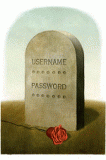
Does your Business Have a Will? Digital Asset Protection and Succession Planning

IT Solutions - Stay Secure, Launch Pad News, RevITup Business Care Client Forum, Small Business IT Management 1 comment

digital-deathIf you are a business owner and something happened to you, how many people in your company have access to key digital information?  Specifically, I’m referring to the digital files that entrepreneurs go to great lengths to keep private. And at many small companies the owner is the only one with access to important login information that is necessary to keep the business running. Without a plan to pass on those digital files and passwords, sorting through an entrepreneur’s online estate after he or she is gone can be time consuming and frustrating for loved ones.

If you already have a will, your attorney can draft an addendum that spells out who should receive the keys to your various digital accounts. However, a will is not the place for usernames and passwords since it will become a public document.  A better way would be to store the information on a USB flash drive and keep it in a safe-deposit box or a safe in your home. Along with that, it is important that you include instructions so your successor knows how your data is organized, including email and where sensitive company information is stored.  Most importantly, keep this master information updated and make sure someone you trust knows where to find it if the need arises.

Here are 5 Basic Steps to Digital Succession Planning

Step 1. Inventory Your Digital Assets.

Track down and identify a list all of the digital assets. In your digital world, you also want to help your successors by creating an inventory that includes hardware, software, file structures for accessing key data, online accounts and work information.
Continue Reading >>

  • Share/Save/Bookmark
Jun
28

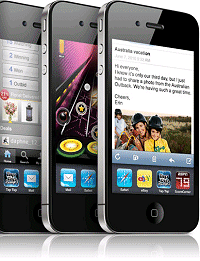
TechRec: iOS 4 Offers Over 100 New Features to iPhone & iPod Users

IT Solutions - Get Mobile, Launch Pad News, TechRecs: Cool Tools & Hot Topics No comments

Apple iPhone 4g

You may have noticed that everyone has been enthralled with their iDevices more than usual this week.  It’s probably because they are busy organizing their 1,947 apps into structured folders or multitasking by listening to music on Pandora while uploading pictures onto Flickr.

This week Apple released its newest operating system, iOS 4. The upgrade, in some form, is available to iPhone 3G and 3GS users, second and third generation iPod Touch owners and will be available to iPad users in the fall.  While Apple brags that iOS 4 offers 100 new features, the buzz seems most to be surrounding these improvements:


Multitasking:
You are now able to run and switch back and forth between third party apps without slowing down the performance of the main app or draining the battery.
Folders: Gain access to your favorite apps at the drop of a hat by organizing them into folders.  Users are able to manage up to 2,160 apps by simply dragging and dropping them into the appropriate folder.
Enterprise Support: iOS 4 works with Exchange 2010 so users are now able to sync their calendar, contacts and email with more than one Exchange account.

Convinced you want to download the iOS 4 upgrade yet? Maybe adding that it is free will help persuade you. Still not sure? How about adding that it’s only four simple steps:

1. Upgrade your iTunes version to 9.2.

2. We recommend you back up your data before running the install, so plug in your iOS device via USB and hit Sync.

3.  When you’re done syncing, click Check for Update.

4. Download iOS 4, then follow the on-screen instructions to install.

That’s it!

For more information about the Apple iOS 4 upgrade, contact sales at (813) 920-0788 x202 or email sales@launchpadonline.com.  Need accessories for your iPod?  Shop our B2B Web online store.

  • Share/Save/Bookmark
Jun
11

Hands-Free Business Continuity | Register for Our Complimentary July Breakfast Seminar

IT Solutions - Stay Secure, Launch Pad News No comments

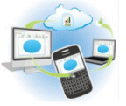
Hands-Free Business Continuity:
Leverage The Cloud, Bulletproof Your Data, Manage Your Documents, Spare Your Wallet

Date:          July 8th, 2010
Time:         8:30 AM - 9:30 AM
Location: 1115 Gunn Highway, Odessa, FL 

Nearly 20% of U.S. companies are forced to cease operations for a period of time due to data loss.  Assuring access to critical information and performing data backups are key elements for business continuity. However, implementing document management is much more than just employing digital filing.  Daily onsite backups, particularly tape, are seductively insufficient.

As a company executive or owner, you need to understand the available technologies for real business continuity.  Join The Launch Pad & eBridge Solutions for a TechEd Interactive Breakfast Seminar and learn how to:

  • Identify the primary risks that exist for your business
  • Understand the 4 core elements of a complete data protection solution
  • Discover a defined and cost-effective strategy for incorporating simple document management
  • Develop an integrated data protection to-go plan that decreases business downtime, reduces legal liability and meets key compliance mandates


For more information, contact Megan Meisner mmeisner@launchpadonline.com or 813 920 0788 x210.

  • Share/Save/Bookmark
Jun
08

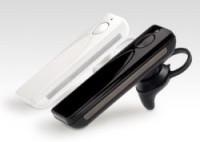
TechRec - Sound ID 510 Bluetooth Headset: There’s an App for That

IT Solutions - Get Mobile, Launch Pad News, TechRecs: Cool Tools & Hot Topics No comments

Recent studies have shown that on the average, the small business workforce spends almost 25% of its time on the road.  Wireless or hands-free devices increase productivity while on the road when they work properly but it can be a challenge to find a decent Bluetooth headset.  Quality of sound, ease of use, and performance are often overshadowed by style, size and compatible accessories.  That may be about to change with Sound ID’s new 510 Bluetooth headset; the world’s first Bluetooth headset with its own iPhone App.  

Sound ID, a company with roots in audiology, designed the 510 with “ear-gonomics” in mind.  The set comes with multiple earpieces and an earhook so users can get a comfortable fit.  While it has the standard onboard features of answering calls and volume control, it’s companion EarPrint iPhone app allows you to tune the audio quality to your own ear.  The app works as an equalizer while adjusting audio compression; softening loud noises and increasing soft ones.  You can also enhance your hearing when not on a call, allowing ambient sounds to pass through your ear rather than acting as an earplug.   Noise-suppression technology separates voices from other sounds making outgoing audio clearer.  And if this isn’t enough, if you misplace your headset the app’s Find Me function will help you track it down. 

With the enhanced app features, the Sound ID 510 really takes bluetooth integration to the next level.  Priced at $130.00, the 510 will be available in June.

  • Share/Save/Bookmark